TikTok Setup
Linking a LIVE
Due to the way TikTok's LIVE API works, you can only link to an online LIVE. If the user is not online, the linking will fail and you will need to manually link the plugin again once the livestream starts.
For ChatPointsTTV's TikTok Module, logging in with an account is not required. To link a LIVE, run the link command followed by the streamer's TikTok username, as shown next:
If the process was successful, the linked username will be saved and the plugin will try to link to their LIVE from now on.
Getting an Eulerstream API key (optional)
ChatPointsTTV's TikTok module is based off of an unofficial TikTok LIVE library, as there are not any official public APIs. This library works with Eulerstream's public, unauthenticated API. However, if this public API reaches a certain limit, access will be limited globally for all unregistered users.
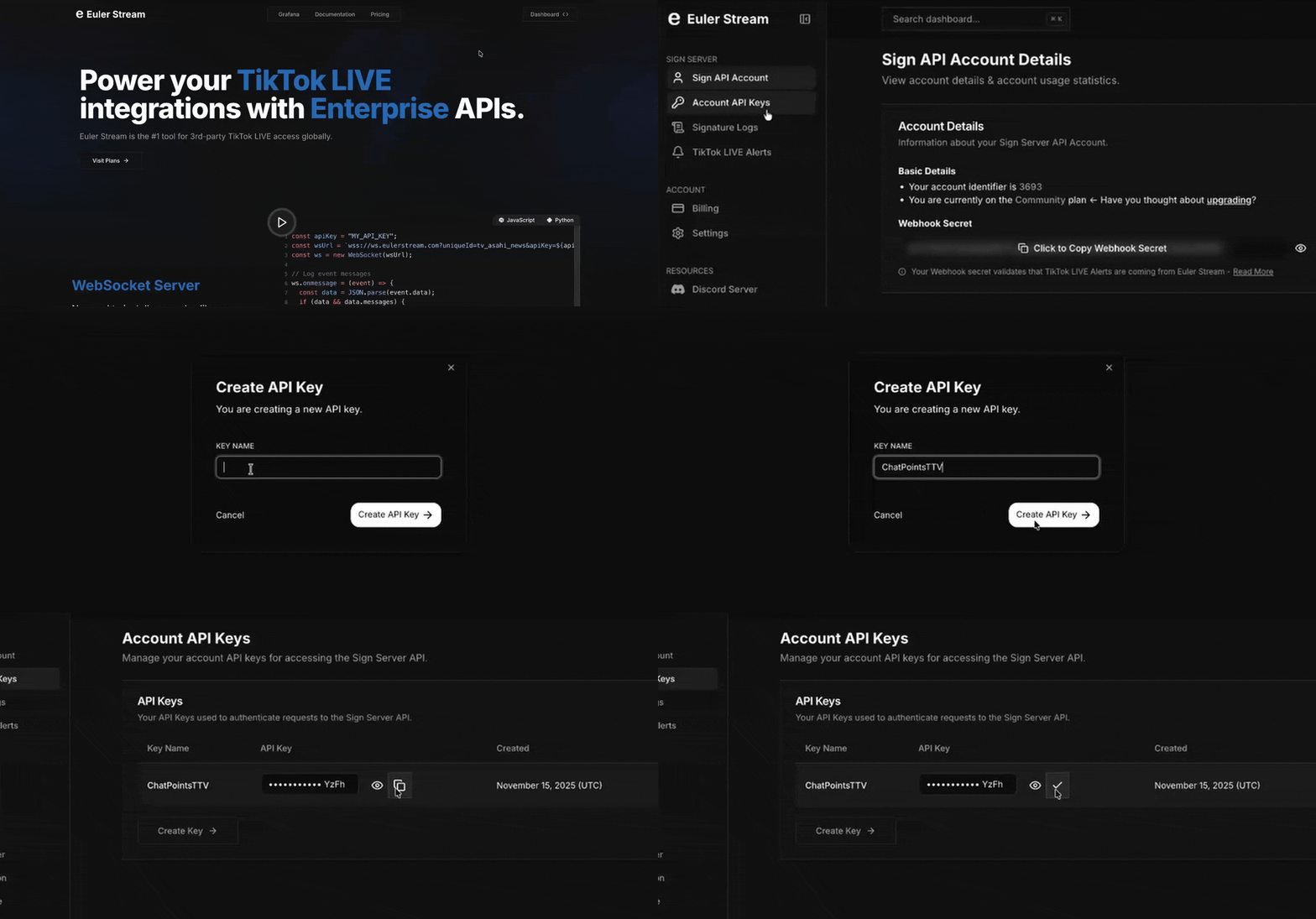
To prevent this, it is recommended to sign up for a (free) Eulerstream API key, which will provide us with personal, expanded API usage limits.
To get an API key follow this steps:
- Navigate to eulerstream.com.
- Click on
Dashboardand sign up for an Eulerstream account. - Go to
API Keys, clickCreate Keyand provide a name for your key. - Copy your API key and save it in your configuration file.